Heatmap
The Heatmap shows how each constituency ranks the 12 competencies relative to one another for the selected account.
Accessing Heatmap
- Log in and select an account.
- Sidebar → EXECUTIVE SUMMARY → Heatmap (outlined in red in the screenshot).
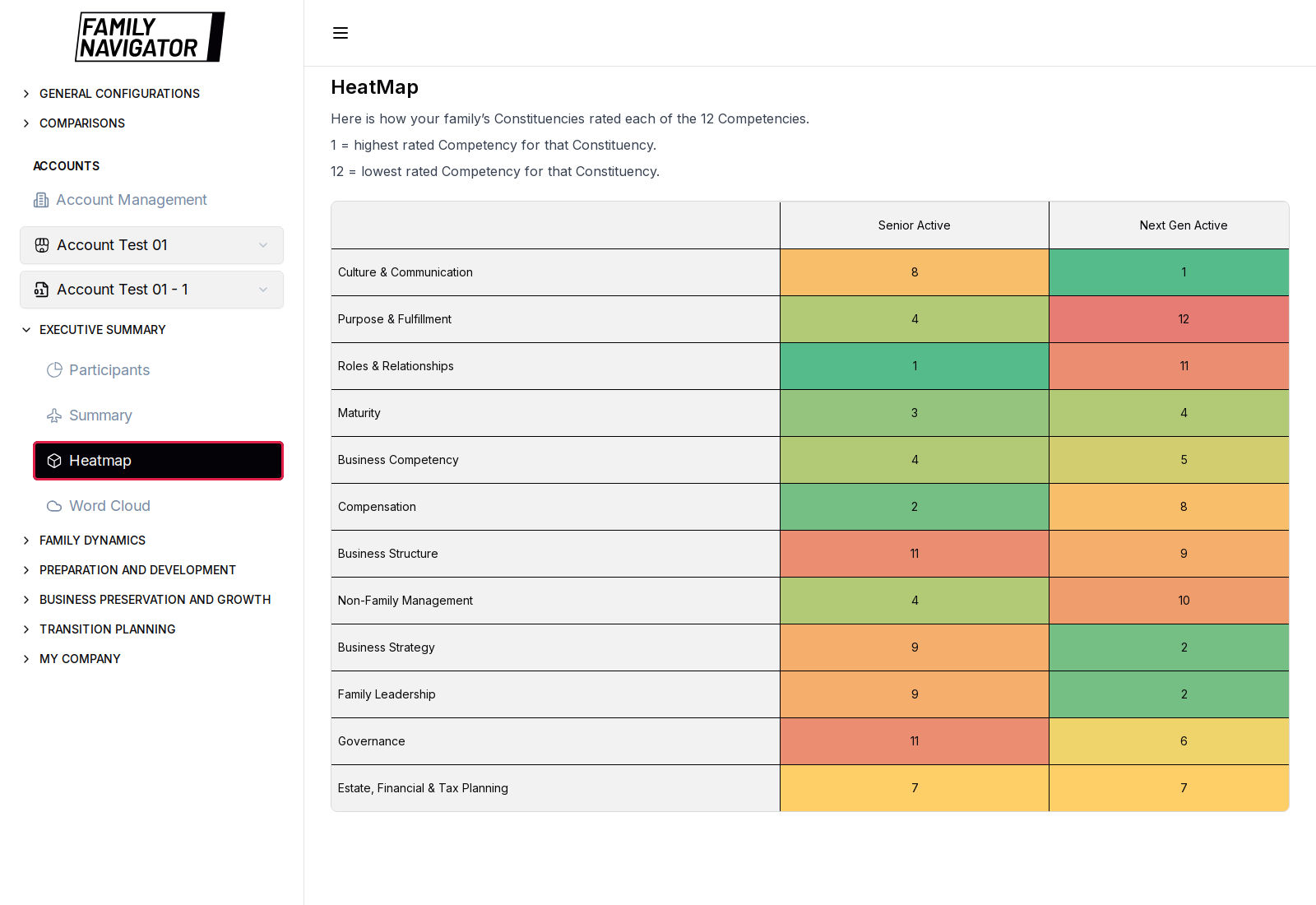
Ranking Scale
The page explains the ranking convention:
- 1 = highest rated competency for that constituency
- 12 = lowest rated competency for that constituency
Colors typically progress from stronger (greener) ranks toward weaker (warmer) ranks so differences between constituencies stand out quickly.
What You See
- A matrix / table of competencies (rows) versus constituencies (columns).
- Competency labels such as Culture & Communication, Purpose & Fulfillment, Roles & Relationships, Maturity, and the remaining Focus Area competencies.
How to Use
- Pick the account you want to analyze.
- Compare ranks across constituencies for the same competency.
- Use large gaps between constituencies as discussion prompts (why perceptions differ).
Notes
- If the account has no completed data, you may see No data available.
- There are no extra filters on this page; scope is controlled by the account selectors.