Summary Scorecard
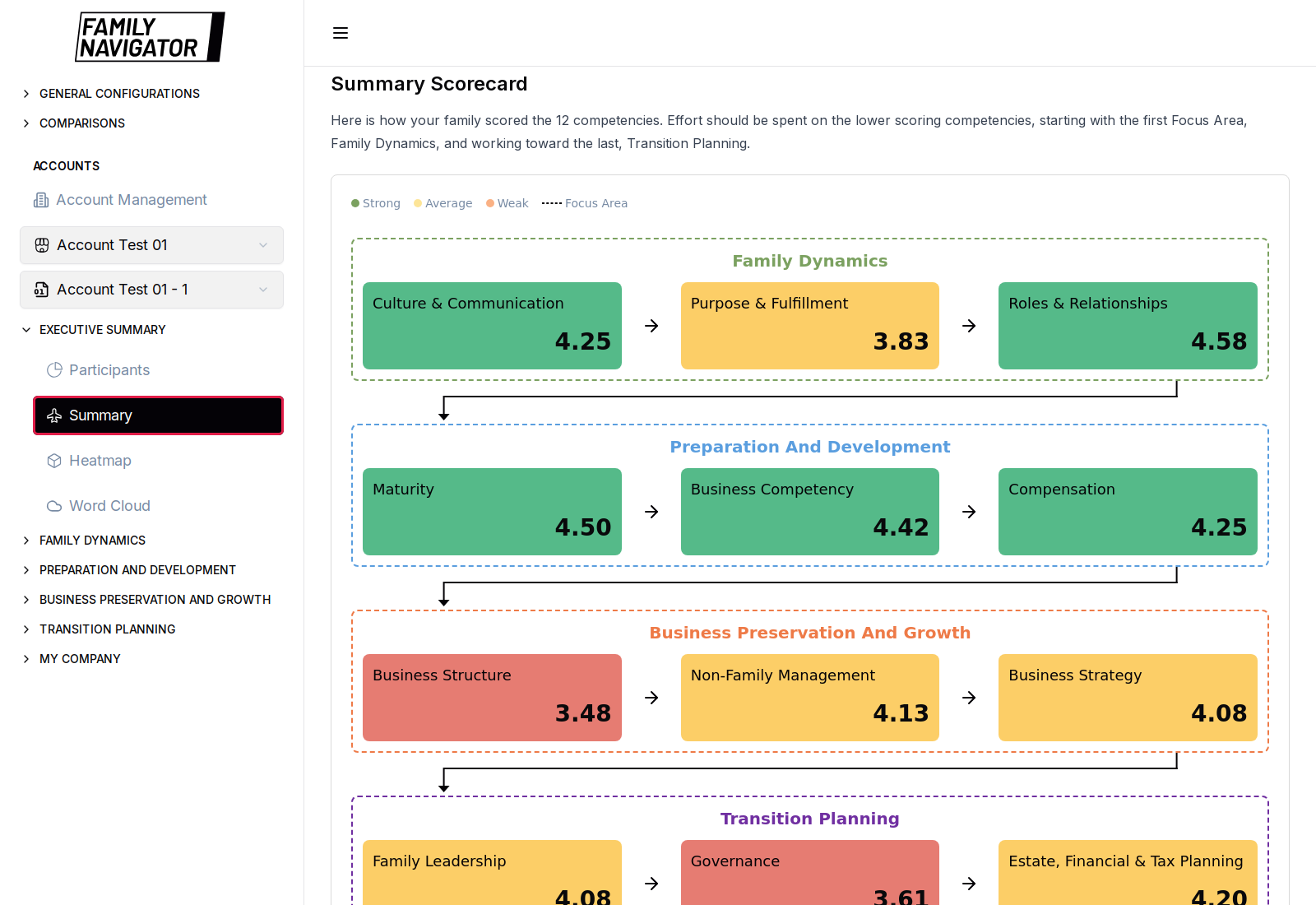
The Summary Scorecard shows how the selected account scored across all 12 competencies, grouped into the four Focus Areas.
Accessing Summary
- Log in and select an account.
- Sidebar → EXECUTIVE SUMMARY → Summary (the active item is outlined in red in the screenshot).
What You See
- Title Summary Scorecard with guidance to focus effort on lower-scoring competencies, starting with Family Dynamics and moving toward Transition Planning.
- A color legend, typically:
- Strong (green)
- Average (yellow)
- Weak (orange / red)
- Four Focus Area sections, each containing three competency cards with average scores, for example under Family Dynamics:
- Culture & Communication
- Purpose & Fulfillment
- Roles & Relationships
- Visual flow between Focus Areas (arrows) to reinforce the recommended pathway order.
How to Use
- Confirm the correct account version is selected in the sidebar.
- Scan Strong / Average / Weak colors to spot priorities.
- Drill into a Focus Area (Overall Scores, Questions, or AI Summary) for detail on weak competencies.
Notes
- Scores update when questionnaire / uploaded answer data changes for the account.
- This page is analytical and does not edit underlying participant data.